
To create this tag you will need:
PSP and Animation Shop
A Tube
I used the fantastic art of Jose Cano
Tubes and license are available at MPT
Xero - Grayscaler and Porcelain (optional)
Kang 1 - The House that Jack Rented
DSB Flux - Bright Noise
AAA Filters - Simplifier
Ready?
Let's Begin!!
New Image 600x250
Fill with a color from your tube
Kang 1 - The House that Jack Rented - Default
Xero - Grayscaler - Default
Hue and Saturation - Colorize to match your tube
Radial Blur
Zoom, Elliptical checked, Strength 22, all other settings 0
Make your FG a light color and your BG a darker color
On the FG make a FG/BG Gradient
Angle 45 - Repeats 3
New Layer
Fill with your gradient
Change the Blend mode to Color
(On the second sample, I used Color (L)- just play with it)
Merge visible
Duplicate layer
Lasso tool set to freehand, feather 20
Select a diagonal area around the middle of the tag
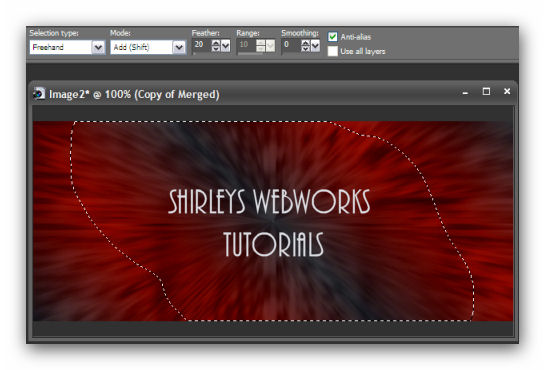
Remember that the selection is feathered, so don't select an area as big as shown
Distortion Effects - Pixellate
Size 10, Symmetric checked
Deselect
Change the blend mode to screen, or some other one you like better
Merge visible
AAA Filters - Simplifier - Default
Duplicate
Select all - Contract 15 - Delete
Expand selection by 5 - Invert - Delete
Deselect - Mirror
Distortion Effects - Warp
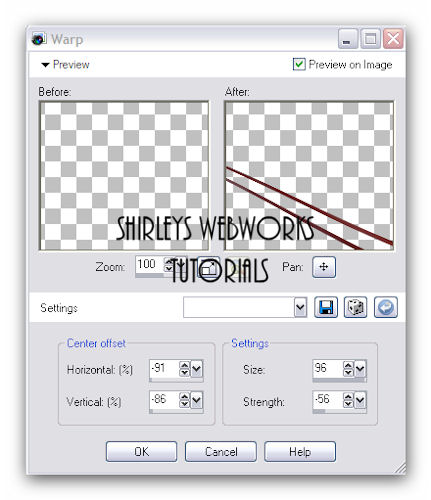
Duplicate this layer twice for a total of 3 layers
Name them warp 1, warp 2 and warp 3
On each of these three layers
DSB Flux - Bright Noise - Mix - 50
Hit the Mix button once for each layer
On each of the Warp layers add a drop shadow 0, 0, 100 and 3
Time to get what we need for the Avatar
Shift + D to copy your Tag
On the copy
Crop to 150 x 150
Add a 1 px border
Add your name or initial and animate as usual
Back to our Tag
Paste your Tube and move to left side and add a blurry drop shadow
Crop your Tag
New Layer - Send to top
Fill with your dark color
Select all - Contract selection by 1- Delete - Deselect
Add your Name, CR info and License # if necessary
Animate as usual
If you need a refresher on how to do this animation,
I have written a little mini-tut to show you how HERE
Sample Sets:




If you try any of my tutorials, I would love to see your results!
Please post a link in the comments on my BLOG
Tutorial idea, Tags/Avis ©Shirley Franklin
www.shirleyswebworks.com
