
To create this set you will need
PSP and Animation Shop - Sold by Corel
A tube and a close-up
I used art by Ismael Rac
Tubes and License can be bought at his Store
Do not use this art without a proper license
Font of choice - I used Carattere Italic
MuRa Meister - Copies
Alien Skin EC 5 Textures - Texture Noise
Xero - Porcelain
Ready?
Lets Begin!
New Image - 600x600
Choose a dark color for your BG and a lighter color for the FG
Make a FG/BG Gradient on the FG
Fill your image with the gradient
Add Noise - Uniform, 66, Monochrome checked
Motion Blur - 45, 100%
Resize to 600x250
Edge Effects - Enhance
Paste your tube
MuRa Copies - Wallpaper Rotate - Default
Radial Blur
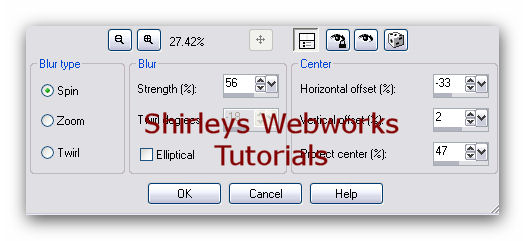
Blend mode to Hard Light - Opacity around 75
Crop your Tag
Ellipse Tool - FG the gradient you made - BG Null
Line Width 15
Draw out an oval taller than your tag
Objects - Align Center
Rasterize and Crop your tag
MuRa Meister Copies - Line - Default
Xero - Porcelain - Blue to 0
Drop Shadow 1, -1, 100 and 1
Select All - Contract 25 - Delete - Keep selected
New Layer - Fill selection with dark color
Contract selection by 2 - Delete - Deselect
Drop Shadow 1, -1, 100 and 1
Copy and paste your close-up tube and move right
Crop your tag
Select all - Contract 25 - Invert
Make sure you're on the tube layer and Delete - Deselect
Change the blend mode to Soft Light - Opacity 75%
Copy and paste your tube and move left
Give your tube a blurry drop shadow
Crop your tag
New Layer - Make sure it's on top
Fill with dark color
Select All - Contract 2 - Delete - Delect
Drop Shadow 1, -1, 100 and 1
If you would prefer to make this tag w/o the animation,
Add your name, CR info and License # if necessary
Then you're done!
ANIMATION
Duplicate your ellipse layer twice for a total of three layers
On each of the three layers
Alien Skin Eye candy 5 Textures - Texture Noise
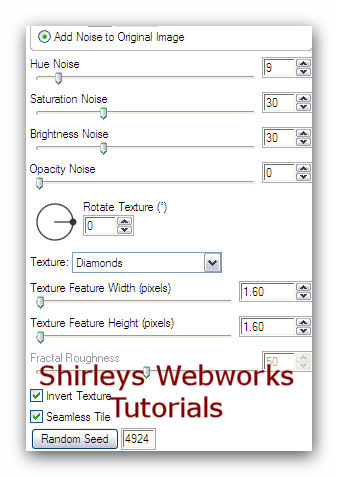
Hit the random seed button once for each layer
Animate as usual
If you need a refresher on how this is done
I have a little mini-tut about it HERE
Sample Sets




If you try any of my Tutorials, I would love to see your results.
Please post a link in the comments section of my Blog
Tutorial Idea, Tags/Avis ©Shirley Franklin
www.shirleyswebworks.com
