You will need PSP I used version X2, but I think it could be done in any version Tramages Panel Stripes, Eye Candy 4000 Corona Tubes and assorted fonts of choice I tubed the boobs and the ribbon, you can get it here Ok, lets get started! New image 600x300 Choose a light color from the ribbon tube for your foreground and a dark color from your ribbon for the background Change the foreground to gradient and choose the foreground/background gradient linear, repeats 1, angle 45 Fill your image with the gradient. Effects>Tramages>Panel Stripes Density 15, depth 98, width 33
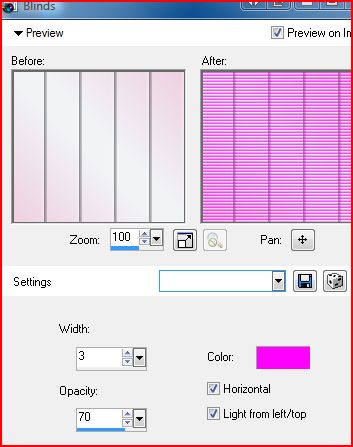
Effects>Texture Effects>Blinds
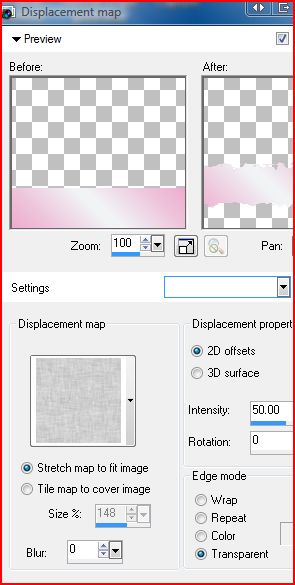
Open your boobs tube :) Image>resize 110% copy and paste as new layer on your tag Move it to the left side. Change the blend mode to Luminosity and drop the opacity to 60 New Layer draw out a long, thin rectangle on the bottom right side and fill it with your gradient. Deselect Distortion Effects>Displacement Map
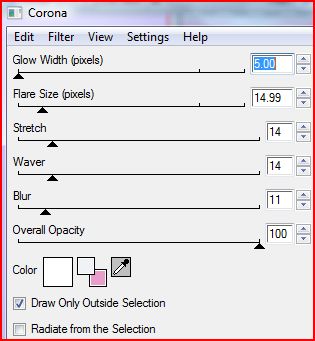
EC 4000 Corona
Duplicate and place both of the strips layers as you wish Open your ribbon tube. Copy and paste as new layer on your tag Duplicate ribbon layer 5 times and place them above one of the strips Once you have everything put where you want it, merge visible Add a 2 pixel border in a dark color to compliment your tag
Now it's time to make your own wordart! I used 5 different fonts in this tag. Type out your text and place on and around your strips the way you want it. (Side note: How I did that tiny white outline on the October is breast cancer awareness month text. Type out your text in a dark color, convert to raster Select all, modify, expand by 1px-Keep selected! Make a new layer above the bottom layer. Get your airbrush out and use the default settings use the airbrush to fill the selection. Deselect. And thats it! ) Add your (C) info, my images came from sxc.hu Merge all, resize and unsharp mask at the default settings and you're done I made an avi to match
Thank you for trying my tutorial! I hope you had fun and maybe learned something
This tutorial and webset are (C) Shirley Franklin http://www.shirleyswebworks.com 
|